
Download CyE Drive Meter – Free Disk Space Analyzer for Windows, Secure & Lightweight Tool
CyE Drive Meter is a powerful, free software tool designed specifically for Windows users who want to monitor and manage their disk space efficiently. Developed by CyE Corp, this lightweight utility offers a clean, intuitive interface that simplifies the process of analyzing drive storage. Whether you're a casual user or a power user managing large volumes of data, CyE Drive Meter helps you identify space-hogging files, visualize storage usage, and maintain optimal system performance.
With real-time disk monitoring and detailed breakdowns of folder sizes, this software empowers users to make informed decisions about file organization and cleanup. The tool is ideal for anyone looking to free up space, prevent system slowdowns, and maintain a well-organized digital workspace. Download CyE Drive Meter today and take full control of your storage with a secure, fast, and reliable file management solution.
Why CyE Drive Meter Stands Out Among Free Disk Analyzers
When it comes to managing disk space on Windows, users are often overwhelmed by the clutter of unnecessary files and inefficient storage practices. CyE Drive Meter addresses this challenge with a streamlined, user-friendly approach that sets it apart from other disk analysis tools. Unlike heavier software that slows down your system, CyE Drive Meter is designed to be lightweight and efficient, consuming minimal CPU and memory resources.
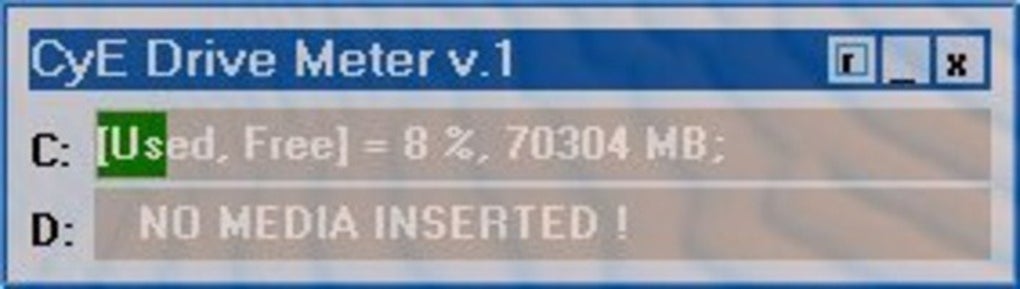
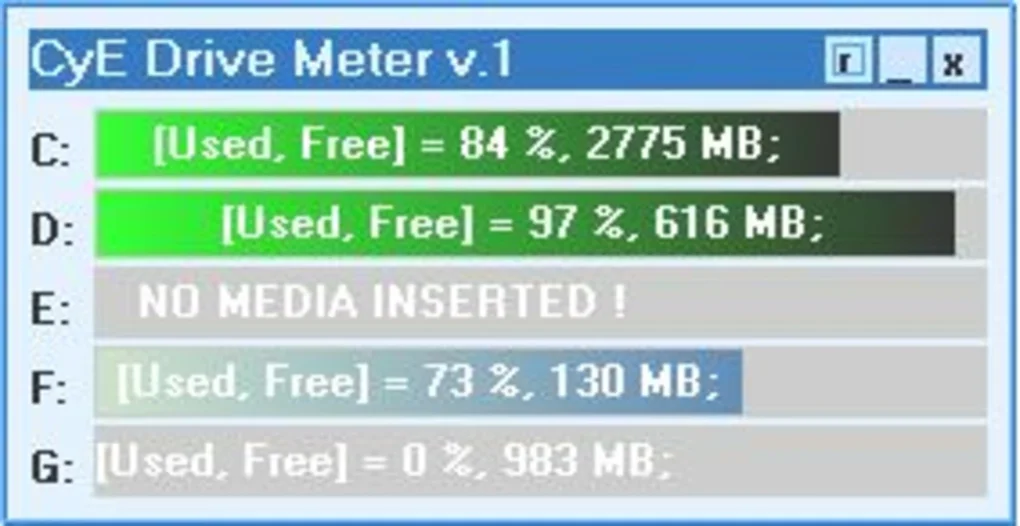
This ensures smooth performance even on older or low-spec machines. The program provides a real-time visual representation of your hard drives, allowing you to instantly see which folders and files are using the most space. Its intuitive color-coded pie charts and hierarchical tree views make it easy to identify large files or directories without needing technical expertise.
One of the standout features is the ability to scan multiple drives simultaneously, including internal SSDs, external USB drives, and networked folders. This flexibility makes it a versatile tool for both personal and professional use. Additionally, CyE Drive Meter supports deep scanning, which dives into subfolders to provide an accurate picture of your storage usage—no more guessing about where your space has gone.
The software also includes a built-in quick action menu, allowing you to delete, move, or open files directly from the analysis view, streamlining the cleanup process. With automatic update checks, users can stay protected with the latest improvements and security patches. Whether you're preparing for a major system upgrade or simply trying to free up space for new projects, CyE Drive Meter delivers reliable results with minimal effort.
How to Install and Use CyE Drive Meter for Optimal Results
Installing CyE Drive Meter is a straightforward process that takes less than a minute. First, visit the official CyE Corp website and download the latest version of the software. The download is completely free, secure, and virus-free, ensuring peace of mind during installation.
Once downloaded, run the installer and follow the on-screen prompts. The setup wizard is minimal and doesn’t require any advanced configuration—just click “Next” and “Install” to complete the process. After installation, launch the app from your Start menu or desktop shortcut.
Upon opening, CyE Drive Meter automatically detects all connected drives and begins scanning. You can choose to scan individual drives or select multiple drives at once. The scanning process is fast, even on large storage units, thanks to the software’s optimized algorithms.
Once the scan completes, you’ll see a detailed breakdown of storage usage, with folders displayed in a tree view and color-coded by size. Clicking on any folder expands it to show subfolders, allowing for granular analysis. Right-clicking on any item gives you quick access to actions like “Open Folder,” “Delete,” or “Copy Path.” This makes it easy to clean up unwanted files without leaving the app.
For advanced users, CyE Drive Meter includes a filter function to search for files by size, type, or name. You can also export the scan results to a CSV or HTML report for documentation or sharing. The software automatically checks for updates in the background, ensuring you always have access to the latest features and security enhancements. Regular updates also improve compatibility with new Windows versions and hardware configurations. With its simple workflow and powerful tools, CyE Drive Meter turns complex storage management into a simple, intuitive task.
Compatibility, Features, and Performance Overview
CyE Drive Meter is fully compatible with all modern Windows operating systems, including Windows 10, Windows 11, and Windows Server editions. It supports both 32-bit and 64-bit architectures, making it accessible to a wide range of users. While it is currently designed exclusively for Windows, its performance remains consistent across different hardware configurations—from budget laptops to high-end desktops. The software does not require administrative privileges to run, though certain actions like file deletion may prompt UAC (User Account Control) prompts for security reasons.
Key features include real-time disk monitoring, deep folder scanning, visual storage charts, quick file actions, and automatic update checks. The tool is entirely free to use with no ads, in-app purchases, or hidden fees. It also maintains user privacy by not collecting or transmitting personal data. The interface is clean and distraction-free, focusing solely on functionality. Performance-wise, CyE Drive Meter is impressively fast—scanning a 1TB drive typically takes under 3 minutes, depending on drive speed and file density.
For users managing large media libraries, development projects, or backup archives, CyE Drive Meter provides invaluable insights. It helps prevent system crashes due to full drives and improves overall system responsiveness. The lightweight design ensures it runs in the background without slowing down your computer. Whether you're a student, professional, or home user, this software delivers reliable, accurate results with minimal resource usage. It’s a must-have tool for anyone serious about maintaining a healthy, efficient digital environment.
- Real-time disk space monitoring
- Deep folder and file scanning
- Color-coded visual storage charts
- Quick actions: delete, move, open
- Export scan results to CSV/HTML
- Automatic update checks
- Lightweight and fast performance
- Supports multiple drives and network paths
Pros and Cons
- Pros: Completely free, no ads, lightweight, fast scanning, intuitive interface, secure, automatic updates, supports multiple drives.
- Cons: Windows-only (no Mac or Linux version), limited customization options, no cloud integration.
FAQ
Is CyE Drive Meter safe to download and use?
Yes, CyE Drive Meter is completely safe to download and use. It is developed by CyE Corp and distributed through official channels. The software is virus-free, does not contain malware or spyware, and respects user privacy by not collecting personal data.
Can I use CyE Drive Meter on Windows 11?
Absolutely. CyE Drive Meter is fully compatible with Windows 11 and has been tested on the latest versions of the operating system. It runs smoothly and integrates well with modern Windows features.
Does CyE Drive Meter support external hard drives?
Yes, CyE Drive Meter supports all connected drives, including external USB drives, SD cards, and network-attached storage (NAS) folders. You can scan and analyze them just like your internal drives.
Can I export the scan results for future reference?
Yes, the software allows you to export detailed scan reports in both CSV and HTML formats. This is useful for documentation, sharing with IT teams, or tracking storage trends over time.
Is CyE Drive Meter updated regularly?
Yes, the developers at CyE Corp release regular updates to improve performance, fix bugs, and enhance compatibility. The app checks for updates automatically in the background.
Final Thoughts: Why You Should Download CyE Drive Meter Today
CyE Drive Meter is more than just a disk analyzer—it’s a smart, reliable, and free tool that helps you maintain control over your digital space. With its fast scanning, intuitive design, and powerful features, it delivers excellent value without any cost. Whether you’re trying to free up space for a new game, optimize your work environment, or prevent system errors caused by full drives, this software makes the process simple and effective. It’s especially beneficial for users who want a no-nonsense, secure solution that doesn’t compromise performance.
If you’re tired of guessing where your disk space has gone, it’s time to take action. Download CyE Drive Meter now and enjoy a clutter-free, high-performing system. It’s one of the best free tools available for Windows users, combining functionality, speed, and security in a single lightweight package. Don’t wait—start managing your storage like a pro today!
CTA: Download CyE Drive Meter Free Now – Secure, Fast, and Lightweight for Windows







